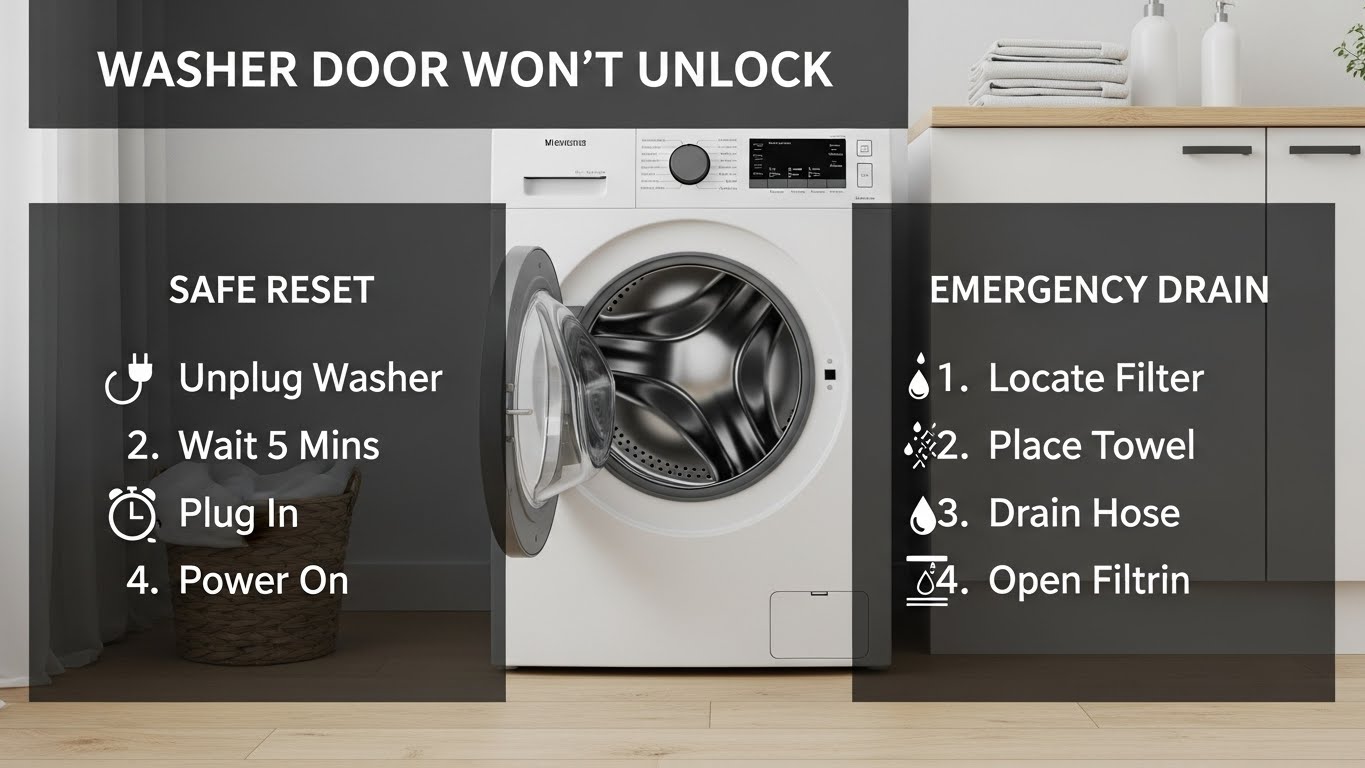
Washer door won’t unlock? Don’t force it—prove the “safety conditions” first.
A locked washer door is usually the machine saying: “I still sense spin, water, heat, or lock mode.” The fastest safe win is this order: Stop → Lock Mode → Reset → Drain → Gentle de-bind.
Key number #1Some models take 2–5 minutes after Pause before the lock releases.
Key number #2If the drum is hot, waiting 2–3 minutes can be the “fix.”
Key number #3A reset helps, but water detection beats reset. Drain first if needed.
One-page promise
- Spot “normal delay” vs “real fault” quickly—without breaking the handle.
- Unlock safely by clearing water-level lock logic first.
- Clear stop signs so you don’t turn a lock issue into a leak issue.
⚠️ Safety / Red flags (stop here)
- Unplug first before opening any lower access door, draining, or touching anything near wiring.
- Don’t pry the door: broken handles and torn seals cause leaks and expensive repairs.
- Stop and call service if you smell burning, hear grinding, see water leaking under the washer, or the door is locked with repeating error codes.
- If the cycle was hot/sanitize and the door feels hot, wait a few minutes before trying again—steam/hot water risk.
Updated: 2026-01-21 • Works for most front-load + many top-load models • Plain-English troubleshooting
The worst part of a locked washer door isn’t the delay—it’s the panic. I’ve watched people yank so hard they crack the handle, and suddenly the “won’t unlock” problem becomes “won’t close and leaks.” Most of the time, the washer isn’t failing. It’s enforcing a safety rule. Our job is to prove which rule is still “true.”
On this page
- How washer door locks work
- 5-step safe unlock protocol
- Emergency drain (front-load) — the real unlock button
- Diagnostic matrix
- Common mistakes
- When to call service
- FAQ
How washer door locks actually work (plain English)
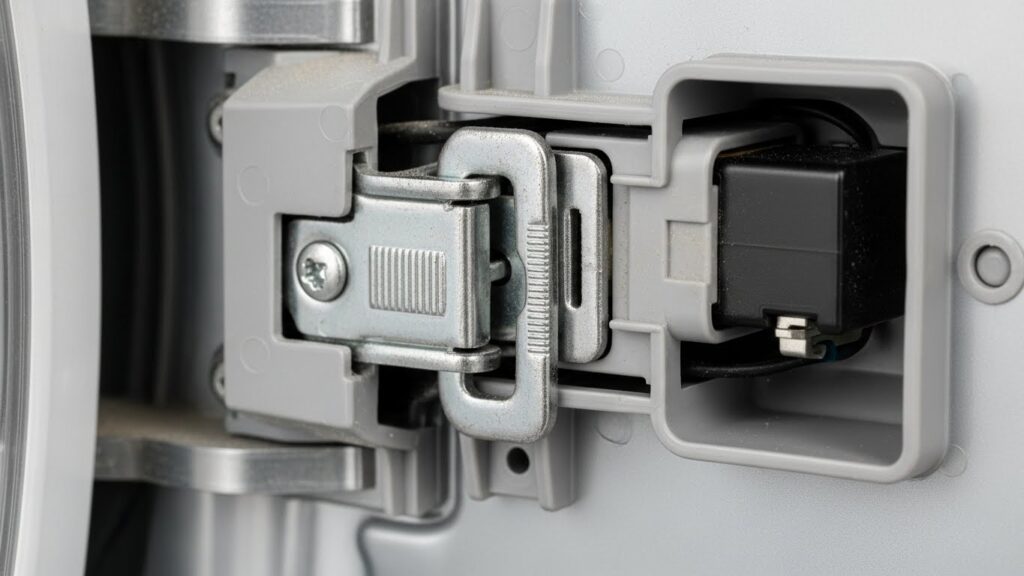
A washer door lock is a safety interlock. The control board keeps the door locked if it thinks opening could cause: a spill (water still detected), injury (spin not fully stopped), or burns (hot water/steam). Even if the drum looks empty, a sensor can still say “not safe yet.”
The simplest “unlock logic”
- Spin = stopped (no ramp-down / no drain hum)
- Water level = low (pressure switch satisfied)
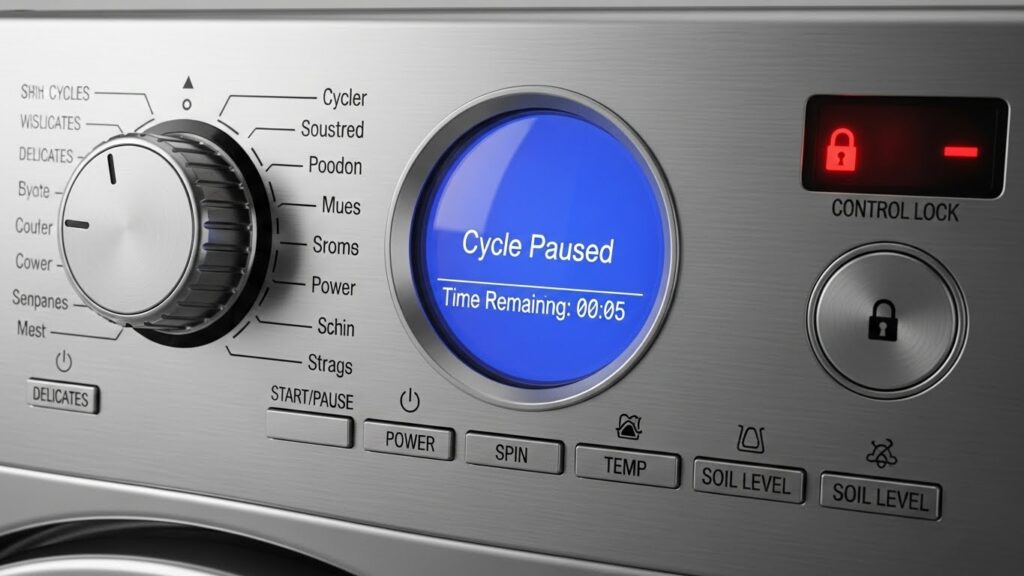
- Lock mode = off (Control Lock / Child Lock not active)
- Heat = safe (some cycles hold the lock briefly after hot wash)
| Lock reason | What you’ll notice | Best first move |
|---|---|---|
| Stop / drain delay | Paused, but it still hums, drains, or slowly tumbles | Wait and confirm it fully stops |
| Water-level lock | Lock light stays on; you suspect water remains | Drain safely (front-load: emergency drain) |
| Control / Child Lock mode | Buttons behave “disabled” or weird | Turn lock mode off (panel label varies) |
| Mechanical bind / latch issue | Hard jam even after drain + reset | Stop forcing; consider service |
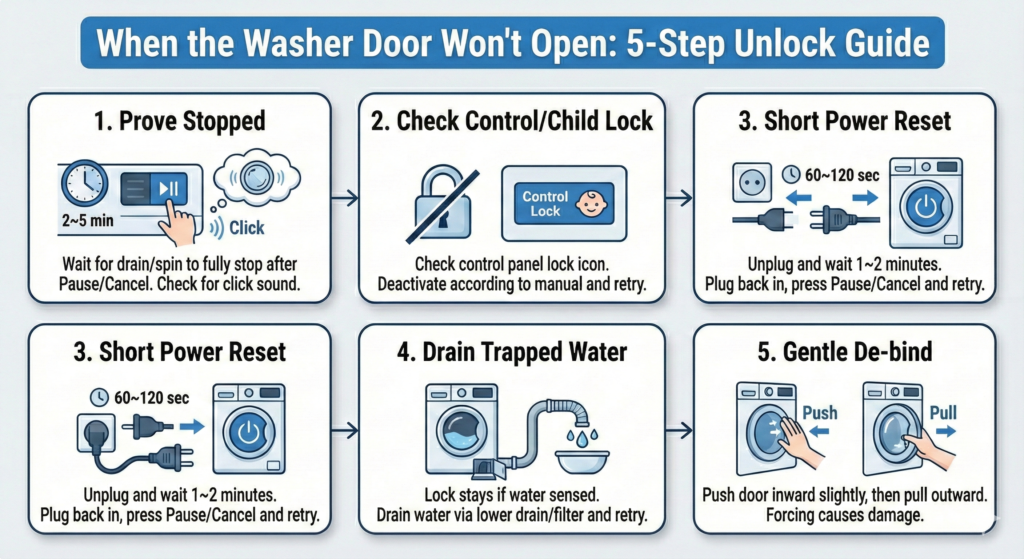
Priority Fix Protocol (5 safe steps)
Before you start (30 seconds)
- Put towels down. Keep a shallow pan/bowl nearby (front-loaders can release water during drain steps).
- If the washer was running hot, wait a moment—steam/hot water burns are real.
- If you’ll open any access cover: unplug first.
- Step 1 — Prove the washer is truly stopped (2–5 minutes):
Press Pause/Cancel and wait. Many machines will not unlock until draining/spinning fully stops.
Listen: the drain pump hum should end, the basket should be still, and you may hear a “click.”
If it unlocks after waiting, this was a normal safety delay—not a defect. - Step 2 — Check Control Lock / Child Lock (30–60 seconds):
Look for a lock icon or “Control Lock / Child Lock” label on the panel. If it’s active, controls can be restricted and the door may stay locked.
Turn it off using the panel’s labeled method (varies by model). Then retry the door normally. - Step 3 — Do a short power reset (1–2 minutes):
Unplug the washer for 60–120 seconds, then plug it back in.
Press Pause/Cancel once, wait briefly, and try opening the door.
Reset helps a “stuck state,” but it won’t override water detection. - Step 4 — If water is trapped, drain it before trying again:
If the washer still senses water, it keeps the lock engaged—even if it looks “almost empty.”
For most front-loaders, use the lower access door to drain and/or clean the pump filter area (details below).
Once drained, wait a moment and retry unlock. - Step 5 — Gentle de-bind (no prying):
Push the door inward slightly (relieves latch tension), then pull outward normally.
If it feels like a hard mechanical jam after drain + reset, stop forcing it—this is where handles and seals get damaged.
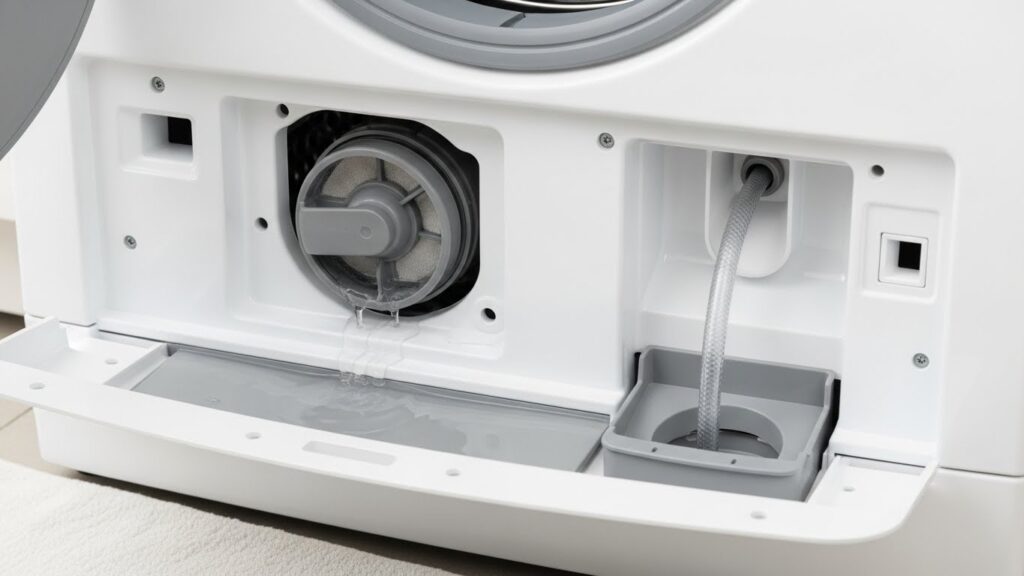
Emergency drain (front-load) — the real “unlock button”
If the washer’s pressure sensor still “sees” water, it can refuse to unlock. Draining safely is often what finally satisfies the logic. The exact layout varies, but the pattern is common: a lower access cover, a filter cap, and sometimes a small drain hose.
Warm warning
If you paused a hot cycle, water can be very hot. Let the unit sit briefly before draining. Use gloves if needed.
- Unplug the washer.
- Open the lower access door/panel. Place towels and a shallow pan.
- If there’s a small drain hose: pull it out gently and drain into the pan (slow and controlled). Re-cap the hose securely.
- If there’s a pump filter cap: open it slowly (water may rush out). Remove debris (lint, coins, hairpins), rinse, and reinstall firmly.
- Close everything tightly to prevent leaks, plug the washer back in, and retry the door unlock.
Diagnostic matrix (what you see → likely cause → safest move)
| What you see | Most likely | Best first action | DIY risk |
|---|---|---|---|
| Lock light on right after Pause | Normal stop/drain delay | Wait until fully quiet | Low |
| Door feels hot after hot cycle | Heat safety hold | Wait a few minutes, then retry | Low |
| Buttons don’t respond normally | Control/Child Lock mode | Turn lock mode off | Low |
| Door won’t open + water likely inside | Water-level lock | Emergency drain + filter check | Medium |
| Burning smell / grinding / water leaking | Electrical or mechanical fault | Unplug + service | High |
Timing plan (fast path vs full path)
| Time you have | Do this | Goal |
|---|---|---|
| 2–5 minutes | Pause → wait → confirm full stop | Catch normal safety delay |
| 5–10 minutes | Check Control/Child Lock + short power reset | Clear “stuck state” safely |
| 15–25 minutes | Emergency drain + pump filter check | Clear water detection condition |
| Stop point | Burning smell / grinding / active leak / repeating error codes | Prevent damage and stay safe |
Common mistakes (that make it worse)
- Prying the door open: this cracks handles and tears gaskets—then you get leaks.
- Skipping the water check: resets don’t override “water present” logic; drain is the real fix.
- Ignoring lock mode: Control/Child Lock can look like a broken latch.
- Rapid repeat power cycling: it can confuse the control state and waste time. Use one reset, then move on.
When to call service (smart, not dramatic)
Call service if the door remains locked after you’ve done: full stop → lock mode off → one reset → drain, especially if the latch feels mechanically jammed. Also call if there’s a burning smell, grinding, repeated error codes, or water leaking under the unit. Forcing it can break the lock assembly and door seal.
Cost reality (why forcing the handle is the expensive move)
| Part / issue | What it usually feels like | Why it matters |
|---|---|---|
| Normal delay / lock mode | It unlocks after waiting or disabling lock mode | Free fix—no parts needed |
| Trapped water / clogged filter | Lock light stays on until you drain | Cleaning prevents future drain failures |
| Latch bind / worn lock | Hard jam after drain + reset | Forcing it can break handle + gasket (bigger repair) |
FAQ
How long should I wait after pressing Pause?
If the washer is still draining or ramping down, it may take a few minutes. Wait until it’s fully quiet, then try again.
Why is the door locked if the cycle looks finished?
Sensors can keep the lock engaged for water level, heat, or incomplete drain—even if it “looks” done. That’s why draining/clearing the filter often works when button presses don’t.
What if there’s water inside and the door won’t open?
Don’t force it. Drain first (front-loaders typically have a lower access area with a filter and sometimes a drain hose), then retry.
What is Control Lock / Child Lock and how does it affect the door?
It disables some controls and can make the washer feel unresponsive. Turn it off using the panel’s labeled method (varies by model), then retry the door normally.
Should I unplug the washer to unlock the door?
A short unplug reset can clear a “stuck state.” But if the washer still detects water, you’ll need to drain—reset alone won’t override that condition.
My door feels stuck. Is there a safe way to try again without prying?
Yes: push the door inward slightly, then pull outward normally. This relieves latch tension. If it still feels like a hard jam after drain + reset, stop forcing it.
Is this only a front-load problem?
Front-loaders lock more aggressively because the door is part of the water seal. Many top-loaders also lock during spin or high-water conditions, but they often release sooner once the basket is fully stopped.
Internal Links
- https://homefixatlas.com/washer-not-draining/ — If trapped water is keeping the lock engaged, this guide shows the drain path step-by-step
- https://homefixatlas.com/washer-not-draining-fix-guide/ — Full troubleshooting flow for standing water, slow drain, and pump/filter causes
- https://homefixatlas.com/washer-shaking-or-vibrating/ — Unbalanced spin can cause stop/delay behavior that keeps the door locked longer than expected
Sources & References
- Whirlpool Product Help: Front Load Washer Door Will Not Open
- LG Support: Front Load Washer — How to unlock the door
Professional disclaimer
This guide is informational and focuses on safe, non-invasive checks. If you see leaks, smell burning, hear grinding, or the door remains locked after completing the safe sequence, unplug the unit and consult a qualified technician.
Update log: 2026-01-21 — Merged the fastest “safety logic” flow with a clearer emergency-drain walkthrough, tightened stop-sign rules, and simplified diagnostics for one-page resolution.

I publish step-by-step troubleshooting guides for common home appliance issues (washer, dryer, refrigerator, HVAC basics).
Content is written for everyday homeowners and cross-checked with manufacturer manuals, safety guidance, and trusted public resources.
Posts include practical checks, clear stop-signs for safety, and guidance on when it’s better to call a qualified technician. Updates are logged whenever steps or recommendations change.
Safety note: If you smell gas, see burning, or suspect electrical hazards—stop immediately and contact a qualified professional.